
Mobile applications are more relevant today than ever before. Ideas for creating them are literally "in the air," but not everyone can bring them to life. Nothing will work out without a clear vision of the task, so the question of how to correctly create a Technical Specification (TS) for mobile app development comes to the forefront. Having a technical specification will serve as the foundation for all further work on the application.
According to industry studies, around 70% of digital projects fail, often due to unclear requirements and poor documentation. Projects with well-defined specifications have much higher chances of success — some reports link clear upfront requirements with up to 97% better project outcomes.
These statistics show that a technical specification is not just a formality. It’s a tool that organizes thinking, aligns teams, and guides every decision from design to deployment.
What Is A Technical Specification, And Can You Do Without It?
A Technical Specification for app development is a formulated document that describes the customer's requirements for the future project. The team receives a specific action plan. This helps eliminate any future problems associated with different interpretations and understanding of the customer's conditions.
The TS also serves as a contract in which all conditions for providing the service are formulated. It should include the following points:
Functional scope and product logic
Description of user scenarios. Feature interactions. Behavioral rules. Decision flows. Business rules. Priority mapping. Feature dependencies. MVP boundaries.Technical and operational requirements
System performance targets. Security framework. Data protection model. Storage strategy. Load tolerance. Scalability logic. Compliance rules.System structure and internal logic
Data architecture. Service communication. Component structure. Integration layers. External services. Infrastructure model. Deployment topology.Technology environment
Supported platforms. OS constraints. Device coverage. Development frameworks. Programming environment. Data technologies. API ecosystem.Interface behavior and experience design
Navigation models. Interaction patterns. Screen relationships. Accessibility logic. UX behavior rules. Visual consistency system.Stability and reliability standards
Fault tolerance. System availability. Recovery processes. Monitoring logic. Error management strategy.Delivery process and development flow
Phase planning. Iteration cycles. Release logic. Validation steps. Feedback integration. Control points.Quality control framework
Verification strategy. Test environments. Acceptance logic. Automation coverage. Bug management workflow.Release management and lifecycle support
Distribution model. Update strategy. Versioning rules. Maintenance structure. Support operations.Legal structure and responsibility model
Intellectual property rules. Data governance. Liability areas. Contractual boundaries. Service scope definition.
Key Benefits: Why Technical Specifications Save Time and Money
Some teams skip writing a full Technical Specification because they think it slows them down. They want to start coding fast. They assume requirements can be refined on the go.
In reality, skipping a TS often costs more time and money later. Unclear requirements and shifting expectations are major reasons software projects stall, run over budget, or never finish. Research shows only about 16% of IT projects are completed successfully on time and on budget, while most either fail partially or halt altogether when requirements aren’t clear from the start.
Here’s a quick comparison of development outcomes with and without a proper Technical Specification:
Without TS | With TS |
40-60% of development time spent on clarifications and rework. | Clear roadmap reduces development time by 25-35%. |
Budget overruns average 30-50% above initial estimates. | Defined scope prevents unexpected costs. |
65% of projects fail to meet timeline goals. | Early alignment improves punctual delivery. |
Ongoing scope creep increases defects and fixes. | Upfront requirements cut rework cycles. |
Frequent last-minute changes increase stress and confusion. | Stable expectations boost team efficiency. |
Most stalled projects fail not because of coding errors, but due to unclear requirements. Studies show 32% of software project failures are caused by poor requirements management, and over 50% of budget overruns result from rework due to early requirement issues.
A clear Technical Specification aligns teams from the start. It reduces misunderstandings, cuts unnecessary fixes, and makes budgets and timelines more predictable. Investing in a well‑defined TS saves both time and money.
Stages Of Developing A Technical Specification For An Application
The TS should be drawn up according to specific rules. This ensures consistency in the requirements applied to the finished application by both the customer and the developer. Following a structured approach reduces miscommunication, clarifies expectations, and lays the groundwork for smooth development.
Stage 1: Define the Goal
Defining the goal means clearly stating what the app should achieve and why it exists, which prevents vague directions and misaligned expectations. A poorly defined goal, like “Create an app to engage users,” leaves the team unsure of priorities and measurable outcomes. A strong goal, on the other hand, specifies the target audience, the desired actions, and the measurable results.
For example, one might aim to develop a fitness tracking app for adults aged 25-40 to log daily activity and reduce sedentary time by 15% within three months, or build a mobile e-commerce app targeting millennials that increases repeat purchases by 20% over six months.
Another goal could be creating a language learning app for beginners designed to complete ten lessons per week, improving vocabulary retention by 30% in two months. By defining such clear, specific objectives, the team knows exactly what success looks like, and the TS becomes a strong roadmap for the entire development process.
Stage 2: List Core Tasks
Core tasks translate the goal into actionable steps. Each task should be measurable, assignable, and achievable. Examples include “Design onboarding screens for new users,” “Integrate payment gateway with 3% transaction error limit,” or “Implement push notifications for abandoned carts.” Breaking ideas into concrete actions ensures the team knows exactly what to do and reduces miscommunication.
Stage 3: Platform Selection
Choosing the platform depends on your target audience, market, and budget.
iOS First: Ideal when targeting high-income users, urban demographics, or premium app markets.
Android First: Best for broad reach in emerging markets or mass-market apps with diverse devices.
Cross-platform: Suitable when budgets or timelines are limited, and the app logic is mostly similar across platforms.
Making the right choice early avoids wasted resources and ensures optimal user engagement.
Stage 4: Project Timeline
A realistic schedule is crucial for project success, setting clear expectations for the team and stakeholders. It’s not just deadlines — it includes buffer time for minor delays, revision rounds for feedback, and contingencies for unexpected issues. Avoiding overly aggressive deadlines reduces stress and protects quality. A well-planned timeline balances ambition with practicality, ensuring smooth progress from start to finish.
Stage 5: Budget Planning
Comprehensive budgeting ensures no hidden costs derail the project. Allocate funds for development, design, testing, and post-launch support. Always set aside a contingency budget for unforeseen issues. Review costs regularly and adjust allocations as priorities change to maintain financial control throughout development.
Essential Components of a Mobile App Specification Document
After defining the main parameters — goal, core tasks, platform, timeline, and budget — the next step is to build a clear and detailed structure of the document. At this stage, ideas turn into a system. A well-organized mobile app technical specification explains how the product will work, how users interact with it, and how the development team should implement it. Without this structure, even strong business requirements may lose clarity during the development process.
1. Introduction and Project Overview
This section sets the context for the whole specification document. It answers basic but important questions.
Document purpose and audience.
Here, you explain why the document exists and who will use it. Usually, the audience includes product managers, developers, QA specialists, designers, and stakeholders. The goal is to align everyone before software development begins.Project scope statement.
This is a short outline of what is included in the project and what is not. It prevents scope creep and protects the team from unexpected issues and changes in project direction.Document conventions.
Define abbreviations, technical terms, and formatting rules. If you use specific terminology (APIs, backend, framework, operating system), explain it once to avoid confusion.References to other documents.
Add links to the product requirements document, business requirements, research files, prototypes, or wireframes. This helps maintain adherence to the original app vision.
2. Product Goals and Vision of the Mobile Application
This block connects business context with user requirements and measurable results.
Start with business objectives. These are specific outcomes the company expects. For example, increasing subscription revenue within a year, reducing support workload by automating repetitive requests, or launching a new Android version to reach a wider market. Clear business objectives explain why the product exists and what project success means in numbers.
Then describe user problems. Focus on real pain points: complex onboarding, time-consuming manual actions, lack of mobile access to important data, or unclear navigation. Avoid abstract statements. The goal is to show how the main functionalities solve practical issues for the target audience.
Success metrics translate vision into measurable indicators. Typical metrics include retention rate, daily active users, conversion rate, average session duration, crash rate, and app store rating. Each metric should relate directly to business objectives and reflect product quality.
3. Functional Requirements
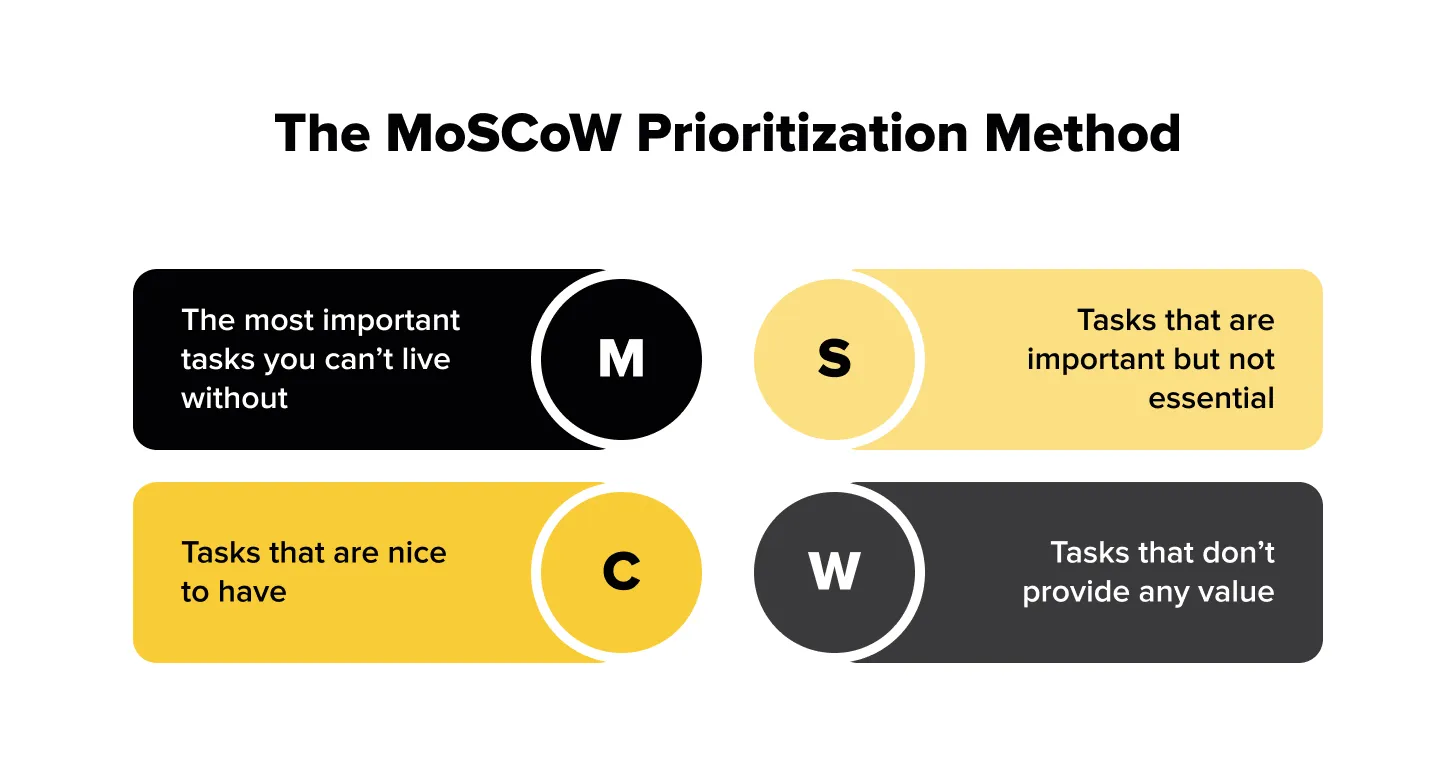
Functional specifications describe what the application must do. Feature prioritization can follow the MoSCoW method. “Must have” features are critical for launch. “Should have” features are important but not blocking. “Could have” elements improve user experience, but are optional. “Won’t have” features are explicitly excluded from the current scope. This approach supports structured mobile app development and protects development time.
Each feature should follow a consistent documentation format. A simple template includes the feature name, priority level, user story, acceptance criteria, and dependencies. Acceptance criteria must be clear and testable so QA specialists can validate them without assumptions.
Instead of long lists, group features into logical categories such as authentication, core functionality, data management, integrations, notifications, and analytics. This makes the specification a detailed but readable guide for the development team.
4. User Scenarios and Flows
User scenarios explain how users interact with the app in real situations.
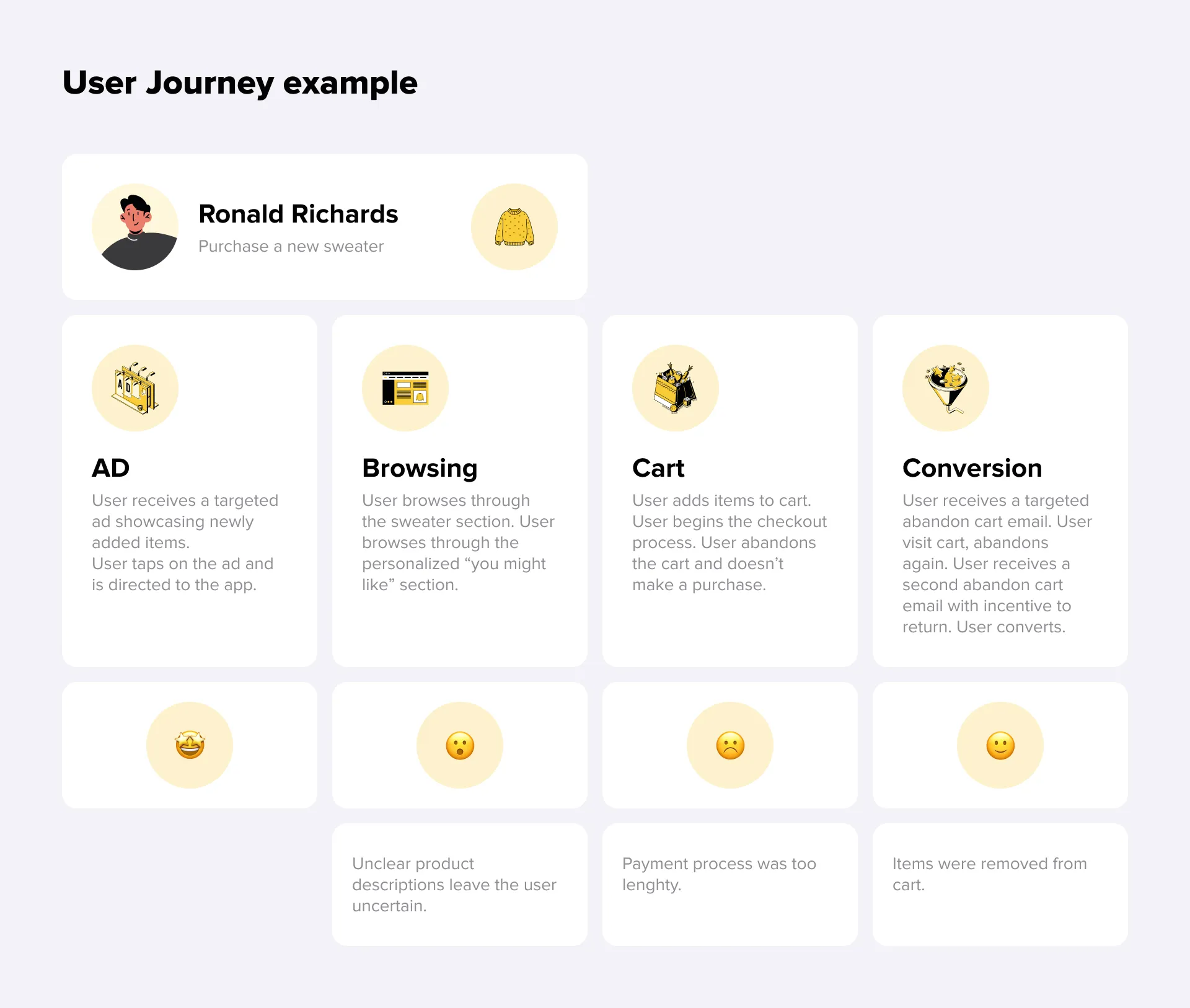
Begin with user personas. A persona usually includes a short profile, goals, frustrations, and devices used. For example, a busy professional using iOS who wants to complete actions quickly without extra steps. Personas help align design and technical requirements with real behavior patterns.
Critical user flows must be documented in detail. These include onboarding, the main success scenario (happy path), error situations, and the return user journey. If these flows are not described clearly, unexpected issues often appear during testing.
A standard flow description contains a trigger, step-by-step actions, possible alternative paths, and the final state. This format helps developers understand how users interact with the app beyond isolated screens.
5. User Interface and Design Specifications
Design documentation explains how users see the product and move through it. It connects structure, logic, and visual rules into one consistent system.
Start with a screen inventory. Instead of listing screens without context, describe each one in a structured way: its name, purpose, main UI elements, navigation logic, and possible states such as loading, empty, or error. When every screen is documented this way, the team clearly understands how users interact with the app and how screens are connected.
Next, define the design system reference. This part fixes the visual foundation of the product: color palette, typography, spacing rules, and interactive elements such as buttons or input fields. You can attach links to Figma files, wireframes, or a prototype to support the description. At the technical specification stage, the goal is not visual perfection but structural clarity. The team needs to understand layout, hierarchy, and behavior before polishing details.
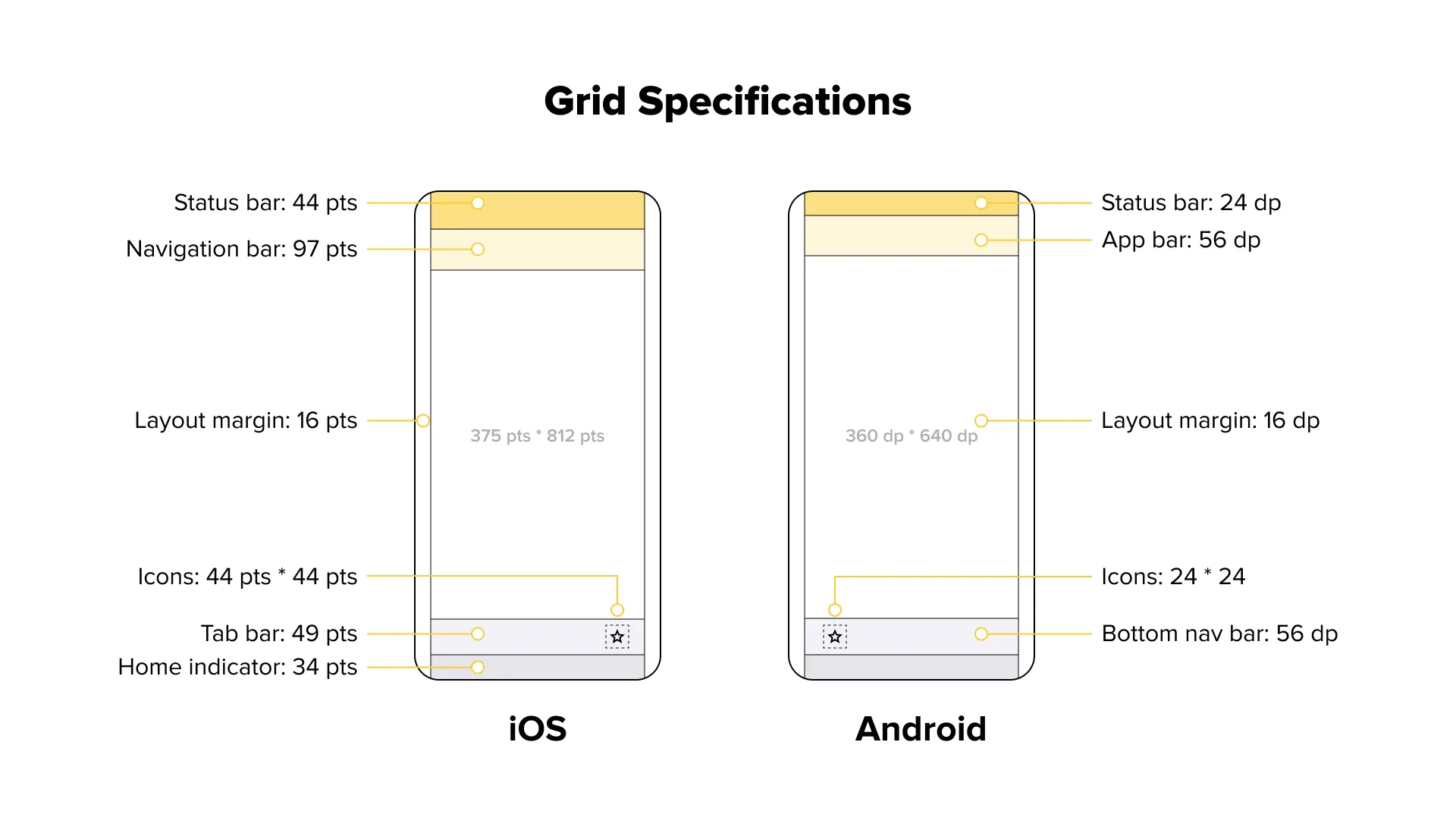
It is also important to highlight platform-specific guidelines. iOS and Android follow different navigation patterns, system components, and gesture standards. These differences should be reflected in the specification to avoid rework during development.
Practical tip: In most cases, wireframes are enough for a technical specification. High-fidelity designs often slow down approvals and create discussions about visual details too early. Focus on structure and logic first, refine visuals later.
6. Technical Architecture and Requirements
This section explains how the product works on the technical level and how business requirements are implemented in the system.
Start by defining the platform and technology stack. Specify whether the app will be native iOS, native Android, or cross-platform, and briefly describe the backend, database, and infrastructure approach. In regulated areas such as healthcare mobile app development, security, and compliance requirements must be defined from the beginning.
Then outline the system architecture. Clarify how the presentation layer, API, data storage, integrations, and infrastructure interact. A simple diagram is often enough to align stakeholders and developers.
Describe third-party integrations in context, explaining how payment services, authentication, analytics, push notifications, or other tools connect to the core system and exchange data.
Finally, document data management: data models, synchronization between mobile and backend, offline support, and migration logic. Specify exact technologies only when required by constraints; otherwise, leave flexibility for the development team.
7. Non-Functional Requirements
Non-functional requirements describe quality standards and system behavior under specific conditions.
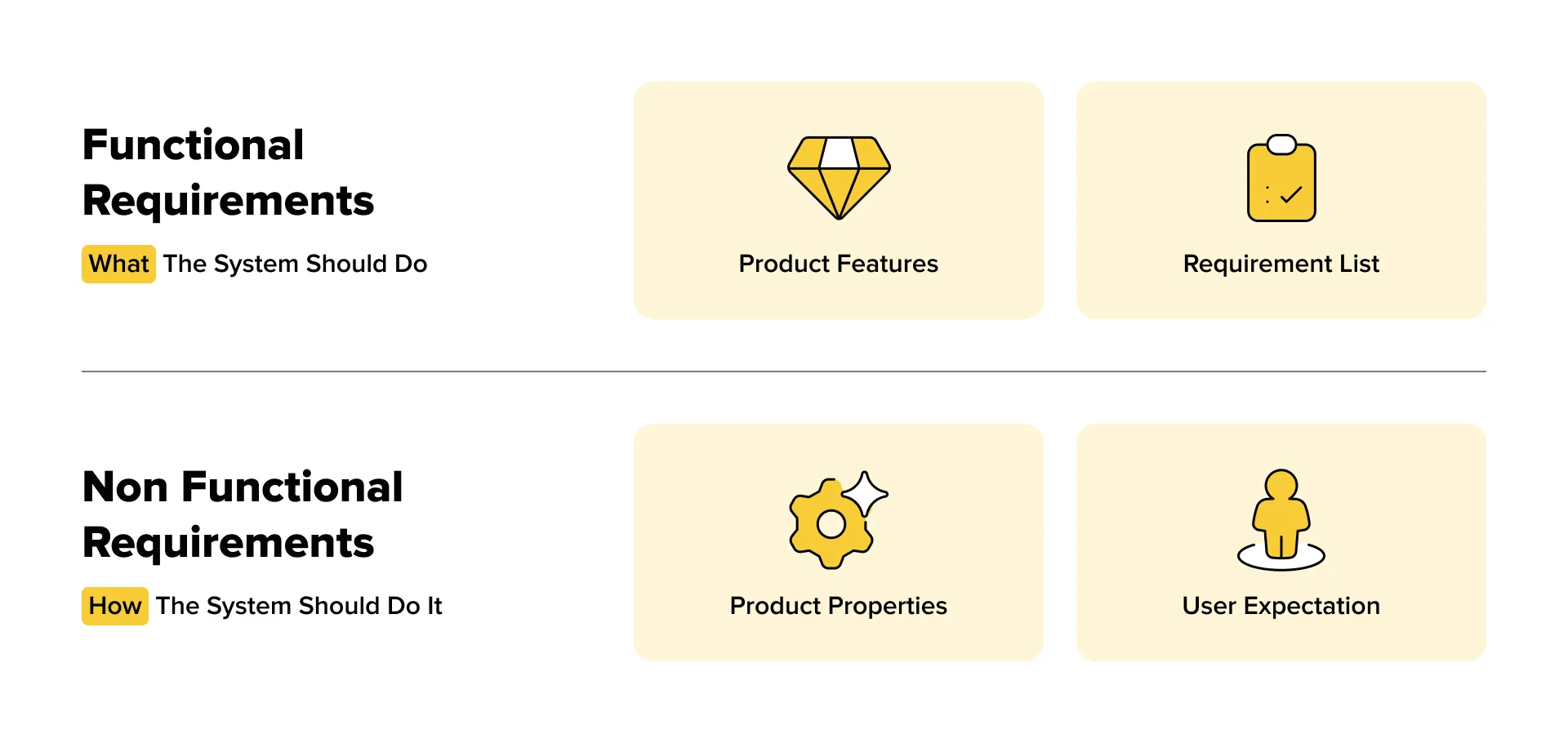
Performance benchmarks should define realistic numbers. For example, application launch under three seconds, screen loading under two seconds, API response under 500 milliseconds, controlled memory usage, and reasonable battery consumption. The acceptable app size should also be specified.
Security and compliance requirements include encryption of data in transit and at rest, secure authentication mechanisms, and compliance with regulations such as GDPR, CCPA, or HIPAA when applicable.
Scalability and reliability define expected concurrent users, uptime targets such as 99.9%, disaster recovery plans, and load balancing strategies. Accessibility standards should address WCAG compliance, screen reader support, sufficient contrast ratio, proper touch target sizes, and text scaling support.
Practical tip: performance and reliability targets must match the app category. A content-heavy platform and a simple utility tool have different expectations.
8. Project Timeline and Milestones
A clear timeline supports predictable delivery.
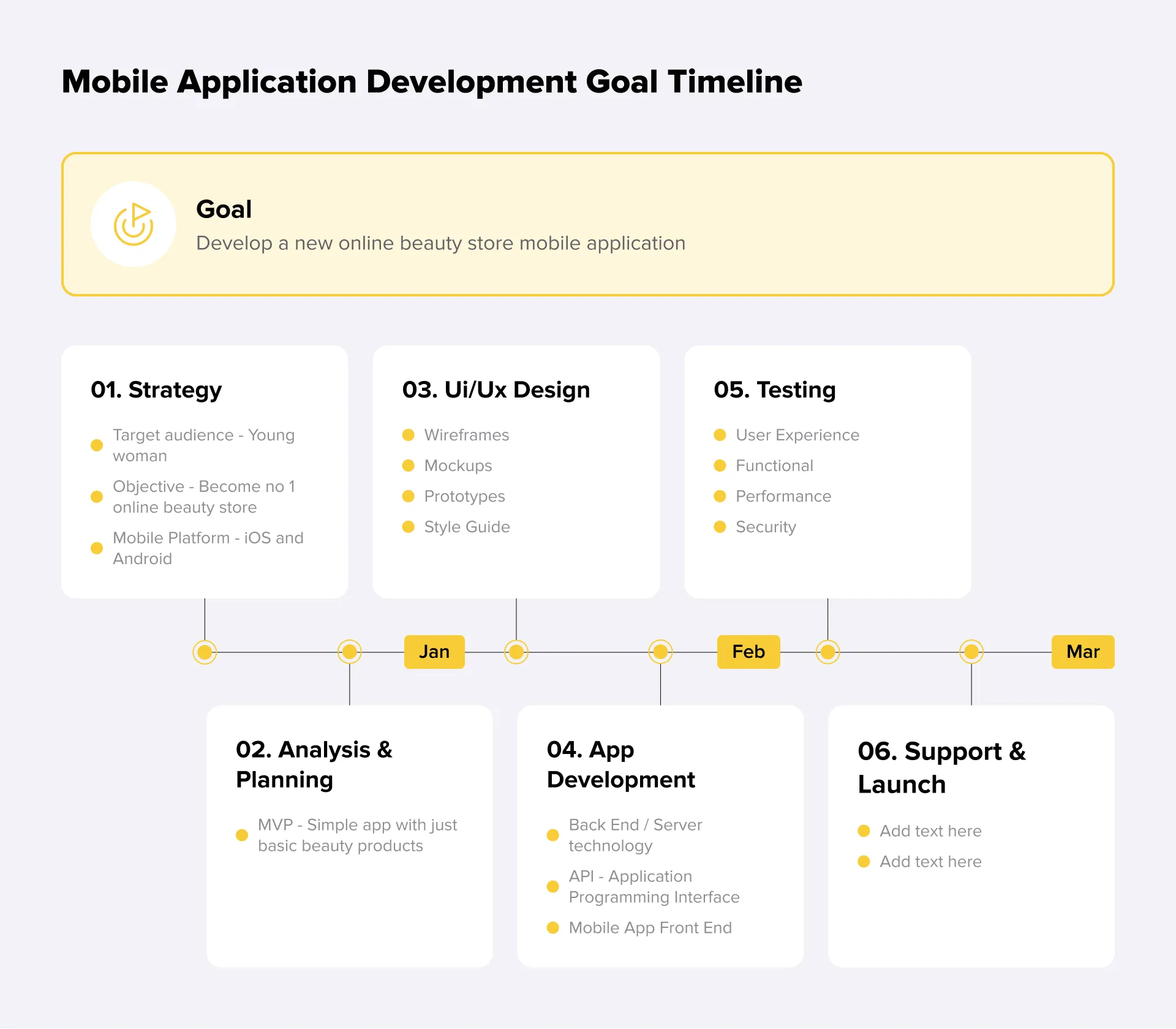
Typical development phases include Discovery, Design, Development Sprints, Testing, Beta release, and Launch. Each phase should have defined timeframes and expected outcomes. Milestones must include specific deliverables, such as an approved prototype, completed sprint functionality, tested build, or final release candidate.
Resource allocation should describe team composition during each phase. Discovery often involves product managers and analysts, while development requires frontend and backend engineers, and testing involves QA specialists. Budget considerations must include development costs, infrastructure, third-party services, and ongoing expenses for regular updates and continuous development.
Practical tip: always include a time buffer of 10–20% and use tracking tools to monitor progress and adjust the roadmap if needed.
How to write a TS for mobile app development on your own?
Creating a Technical Specification on your own is possible in certain situations. For example, small apps with simple features, clear objectives, and limited scope can often be documented by someone familiar with the product. A hybrid approach works when you draft the main points yourself and then have an expert review and refine them.
If, after studying all development stages and attempting to create a technical specification independently, a beginner realizes they cannot cope with the task, the best solution is to send the order to professionals with extensive experience. This ensures a high-quality result rather than a document that lacks detail. A proper TS serves as the foundation for rapid and competent mobile app development that meets all requirements and expectations.
TS Structure Checklist
To make sure your TS is complete and ready for development, we’ve created a practical checklist. Following it guarantees that all critical elements are included and nothing is overlooked. This ensures a smooth process for both developers and stakeholders.
Executive Summary - main goals, target audience, and key success metrics.
Product Description - app purpose, core features, and unique value.
Functional Requirements - user stories, workflows, and feature logiс.
Technical Requirements - platform, integrations, APIs, and performance criteria.
Design Specifications - UI/UX principles, style guidelines, and mockups.
Non-Functional Requirements - security, scalability, accessibility, and compliance.
Project Scope - deliverables, exclusions, assumptions, and constraints.
Timeline & Budget - milestones, deadlines, resource allocation, and cost estimates.
Conclusion
Creating a mobile app technical specification is a crucial step for any successful project. A well-prepared TS clarifies goals, reduces risks, and guides developers in building exactly what is needed.
The Lampa development studio helps clients create clear and detailed mobile app development specifications tailored to their requirements. After the specification is approved, we develop the mobile application exactly as specified, ensuring that all technical features, design elements, and usage requirements are fully met. This approach results in a high-quality, reliable app and demonstrates the value of a well-prepared specification. By combining careful planning with expert development, we deliver solutions that save time, reduce risks, and maximize the impact of your project.