
Vibe coding tools can convert an idea into a usable application in no time at all; however, speed shouldn't be the only factor in choosing the right vibe coding solution for any product development. The non-technical founder, the frontend developer, and the experienced engineering team have distinct needs. This guide compares the best vibe coding tools for product development by looking beyond the first demo: code ownership, maintainability, production readiness, cost, and the point where real engineering becomes necessary.
What Is Vibe Coding, and Why It Matters for Product Development
Vibe coding refers to describing a piece of software through natural language prompts and having the AI code the implementation. Rather than writing all the functions manually, you can describe a feature, request changes, and see the outcome. It covers the gamut from using an AI IDE as a professional programmer to using a no-code platform where even a non-tech founder can build an entire app.
The primary benefit for a product team is a faster path from ideation to a viable solution. An idea that once required weeks of initial coding can now be prototyped in hours. That makes vibe coding for MVP work particularly useful for testing assumptions before committing a larger engineering budget.
Typical applications include:
MVP validation and investor demos;
internal tools and dashboards;
customer-facing portals;
workflow automation;
early versions of SaaS products;
selected production features.
The important distinction is that vibe coding tools for product development are not one homogeneous category. AI coding agents augment developers inside an existing codebase, while browser-based platforms can generate a full-stack app with a database, authentication, hosting, and deployment. Some vibe coding apps sit between those extremes, giving business users more control than traditional no-code software.
For teams still defining the problem, product strategy and discovery should come before selecting a platform. The right question is not "Which tool is best?" but "What level of control will this product need after the first version?"
How We Evaluated These Tools
The comparison focuses on five factors, not demo quality alone. Speed matters, but it's only the initial test.
Speed: How fast can you turn an idea into a functioning app or feature?
Code quality: Is the generated code written according to common sense and still understandable?
Production-ready: Can you ship it, test it, monitor it, and modify it?
Code portability: Can you take your implementation and export it if needed?
Cost: How do pricing plans behave as usage, team collaboration, and token or credit consumption increase?
A two-minute demo can make almost any AI app builder look impressive. The harder test comes when the second feature changes the first, a bug appears, or another developer has to understand the implementation. That is why this guide gives equal attention to maintainability and ownership.
Best AI IDEs and Coding Agents for Developers
These tools target people who already understand software development. Their purpose is to increase developer output while keeping the underlying codebase under human control.
Cursor
Cursor is a VS Code fork with deep model integration and access to broad codebase context. It can understand existing files and patterns rather than treating every prompt as an isolated request.
Its agentic mode is useful for larger jobs, including multi-file editing and parallel tasks. The resulting code tends to fit an existing architecture when the developer gives precise instructions.
Speed: High, but clear prompting still matters.
Code quality: Strong when working from established patterns.
Best for: Professional developers who want AI assistance without leaving their normal workflow.
Windsurf
Windsurf is Cursor's closest competitor and places more emphasis on its agentic Cascade system. It can take a multi-step request, inspect the project, make changes, and continue with less hand-holding.
That autonomy helps when a developer wants the autonomous agent to handle a larger task instead of manually accepting smaller modifications. The downside is that it may deviate from the original architecture in complex codebases.
Best For: Developers who need larger modifications with less back-and-forth communication.
GitHub Copilot
GitHub Copilot remains tightly integrated within the GitHub environment, making it ideal for organizations already working with pull requests, repositories, Actions, and other GitHub workflows.
It is more useful for inline suggestions and autocomplete instead of asking the agent to create a complete multi-file system. For organizations where GitHub integration, version control, and existing team processes matter more than autonomous generation, that distinction is valuable.
Best for: GitHub-native teams that want AI assistance embedded in an established development process.
Claude Code
Claude Code is a terminal-based coding agent with read/write access to a complete codebase. It emphasizes correctness and reasoning over raw generation speed.
It is particularly useful for complex refactoring, debugging, and work that touches many files. Its testing orientation is also one of its stronger characteristics in this category. MCP integrations can connect the agent with external services such as Jira and Slack, extending its role beyond the terminal.
Best for: Teams that want an AI collaborator for difficult engineering work rather than another autocomplete layer.
Best No-Code and Low-Code App Builders for Non-Technical Teams
The next group moves further from conventional development. These vibe coding platforms are designed to reduce the amount of infrastructure a business team has to configure before an application becomes usable.
Bolt.new
Bolt.new is a web-based full-stack builder that can take a request written in natural language and turn it into an app, deployed on a live URL in no time. Bolt.new's primary feature is its very short path from idea to URL.
That speed makes it attractive for early validation, but code quality and testing support become more important as scope increases. A small prototype is a different engineering challenge from a product with many interconnected workflows.
Best for: Non-technical founders validating an idea and developers who want rapid prototypes.
Lovable
Lovable follows a similar browser-based model but places more emphasis on polished UI output. It can create full-stack applications using Supabase for the backend, database, and authentication.
GitHub export gives teams an escape route when the application needs a more conventional development workflow. That makes it particularly interesting for founders who want to move quickly without accepting permanent platform dependence.
Best for: Non-technical founders who need a polished working MVP with a path toward developer ownership.
Replit (Agent)
Replit combines a cloud IDE with an AI Agent that can plan and build full-stack applications. Hosting, database capabilities, and login are available within the same environment, reducing the need to configure separate services.
It is more developer-oriented than some browser-first competitors and is particularly comfortable with Python and JavaScript. The complete environment can also make the learning curve easier for beginners.
Best for: Beginners and small teams that want development, deployment, and infrastructure in one place.
Base44
Base44 is an all-in-one no-code development platform intended for internal tools and business applications. The platform includes login capabilities, database capabilities, hosting, and logic editing features.
In Base44, the emphasis is not on building a developer-friendly codebase but on giving business users the elements they need to build operational software. Typical applications are CRMs, reporting, dashboards, and workflow tools.
Best for: Non-technical founders and small teams developing business software without setting up a separate stack.
Zite
Zite takes a prompt-to-app approach while keeping workflows, logic, and database structures visible and editable. This is critical for teams that need insight into how the application works, not just an AI-generated output.
It features authentication, hosting, and integration services, with unlimited users included in all its plans, even the free plan. The platform caters to business applications that require role-based access, workflow automation, and business logic.
Best for: Teams working on building dashboards, CRM, internal tooling, or a client portal and who require control over the underlying business logic.
Specialized Vibe Coding Tools
Not every product task requires a complete application. Specialized tools can be more effective when requirements are narrowly defined.
v0 by Vercel
v0 is primarily a UI component generator rather than a full application builder. It produces React components that developers can copy into an existing project, making it extremely fast for isolated interface work.
That narrower scope is its advantage. A team doesn't need to generate an entire backend to explore a page, form, navigation pattern, or design-system element.
Best for: Frontend developers and Vercel-based teams that need clean React components quickly.
FlutterFlow
FlutterFlow is a low-code platform for building native mobile and web applications from a shared project. Its visual editor supports rapid construction, while exportable Flutter code provides more ownership than a purely hosted no-code system.
Applications can be deployed to iOS, Android, and the web, making it suitable when a real native mobile app is required rather than a responsive website presented inside a mobile wrapper.
Best for: Teams that need one codebase that supports iOS, Android, and the web.
Vibe Coding Tools Comparison Table
Tool | Best For | Code Ownership | Production Readiness | Starting Price |
Cursor | Developers who want control + speed | Full (your own codebase) | High | $20/mo |
Windsurf | Autonomous multi-step execution | Full (your own codebase) | High | Freemium |
GitHub Copilot | GitHub-native teams | Full (your own codebase) | High | Included w/ GitHub plans |
Claude Code | Complex, multi-file, correctness-first work | Full (your own codebase) | High | $20/mo |
Bolt.new | Fast idea-to-URL prototyping | Partial (exportable) | Low–Medium | $25/mo |
Lovable | Non-technical MVP builders | Partial (GitHub export) | Medium | $25/mo |
Replit | Beginners, full-stack in the browser | Partial | Medium | $20/mo |
Base44 | Internal tools & business apps | Platform-hosted | Medium | $25/mo |
Zite | Business apps needing visibility & control | Platform-hosted (visible logic) | Medium–High | $19/mo |
v0 | UI components only | Full (copy-paste code) | High (for components) | Freemium |
FlutterFlow | Native mobile apps | Full (exportable Flutter code) | High | $39/mo |
No tool wins on every dimension. The right choice depends on whether the immediate priority is owning the code, publishing a prototype today, or handing the product to an engineering team next quarter.
Vibe Coding Tools by Product Development Stage
The most useful way to compare best vibe coding tools is by the job they need to perform at a particular stage.
Stage | Recommended Tool(s) | Why |
Idea validation / pitch demo | Bolt.new, Lovable | Fastest path from idea to a shareable URL |
Non-technical founder's first MVP | Lovable, Zite, Base44 | Full-stack output without writing code |
Internal tool, dashboard, or CRM | Zite, Base44 | Visible logic and built-in auth/hosting for business data |
Developer-accelerated feature work | Cursor, Windsurf, GitHub Copilot | Operates on your real codebase and patterns |
Complex, multi-file, or refactoring work | Claude Code | Correctness-first, strongest testing orientation |
Single UI component or design system piece | v0 | Narrow scope, clean React output |
Native mobile app | FlutterFlow | Single codebase exports to iOS and Android |
Production feature in an existing product | AI IDE + real engineering review | Vibe-coded output still needs tests, review, and hardening |
For founders moving beyond validation, custom software development becomes relevant when the product requires architecture that a generic builder cannot comfortably provide. The transition does not have to happen on day one; it should happen when product risk becomes more expensive than development speed.
The Gap Between "It Works" and "It's Production-Ready"
A working screen proves that a workflow can execute. It does not prove that the implementation is secure, maintainable, observable, or capable of handling unexpected behavior.
Generated tests can be shallow or absent, particularly in no-code environments. Browser-based builders may produce tightly coupled structures that are difficult to test after several features have already been added. Each new requirement can expose technical debt that was invisible during the original prototype.
Platform-hosted products introduce another consideration: vendor lock-in. If exporting the code isn't an option, or cannot be fully done, migration can become a major task instead of a simple technical step.
Factors such as security, compliance, scalability, and performance become relevant once real users start coming. Just because authentication works in a demo doesn't mean it will hold up in production.
The tools have eliminated the cost of building. They haven't eliminated the cost of breaking.
The practical lesson is simple: evaluate what happens after the successful demo, not only how quickly the demo appears.
Web application development becomes especially relevant when a prototype evolves into a customer-facing system with custom integrations, complex permissions, or requirements that exceed the original builder's workflow.
When Vibe Coding Is Enough — and When You Need Real Engineering
There is no universal boundary between AI-generated software and conventional engineering. The decision becomes clearer when teams assess the product itself.
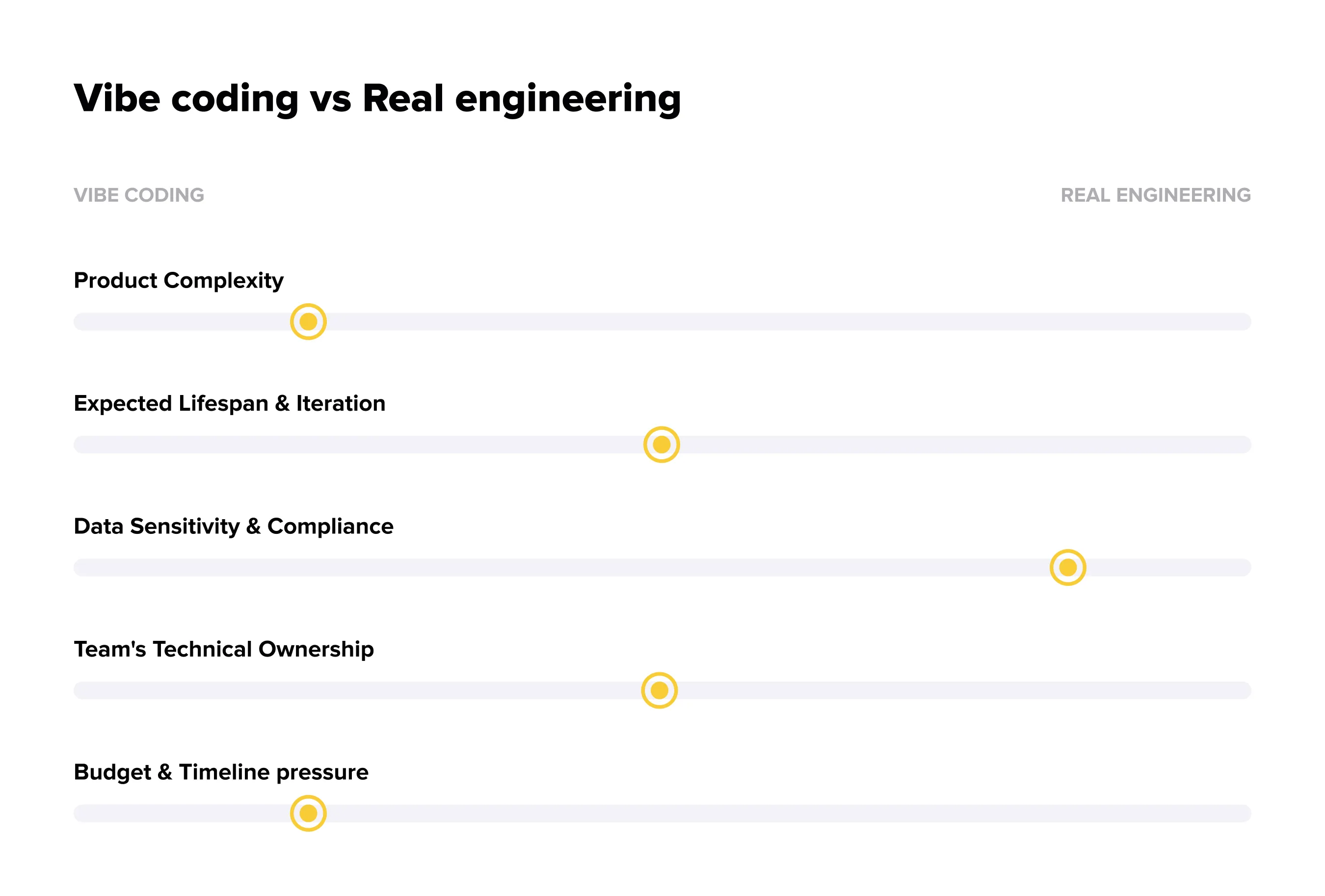
Product Complexity
Simple, well-scoped applications and single-purpose workflows are strong candidates for vibe coding. Products with complicated business logic, many dependencies, or highly interdependent user flows need engineering oversight much earlier. Teams using vibe coding for complex apps should establish technical ownership before the architecture becomes hard to change.
Expected Lifespan and Iteration
A pitch demo or short-lived prototype can remain largely AI-generated. A product expected to evolve for years needs a maintainable codebase, predictable release process, and people who understand its architecture.
Data Sensitivity and Compliance
Applications handling payment information, health data, or regulated records require security review and deliberate architecture. AI generation does not guarantee appropriate access controls, encryption, retention policies, or security compliance.
Team's Technical Ownership
If nobody can read or maintain the generated implementation, dependence on the original platform becomes a business risk. A technical co-founder, software engineer, or external engineering partner can provide an ownership layer that the tool itself cannot. AI development services can also become relevant when AI features need to work reliably within a broader product architecture. This matters particularly for enterprise products that require strict governance and role-based access around those capabilities.
Budget and Timeline
Vibe coding is compelling when time to market and initial cost dominate the decision. Engineering investment becomes more valuable when the application must scale, integrate with other systems, support enterprise requirements, or pass a formal security review.
Moving From a Vibe-Coded Prototype to a Production-Ready Product
The transition should be deliberate, not triggered by the first serious bug. A short technical audit can reveal whether the current foundation is worth extending.
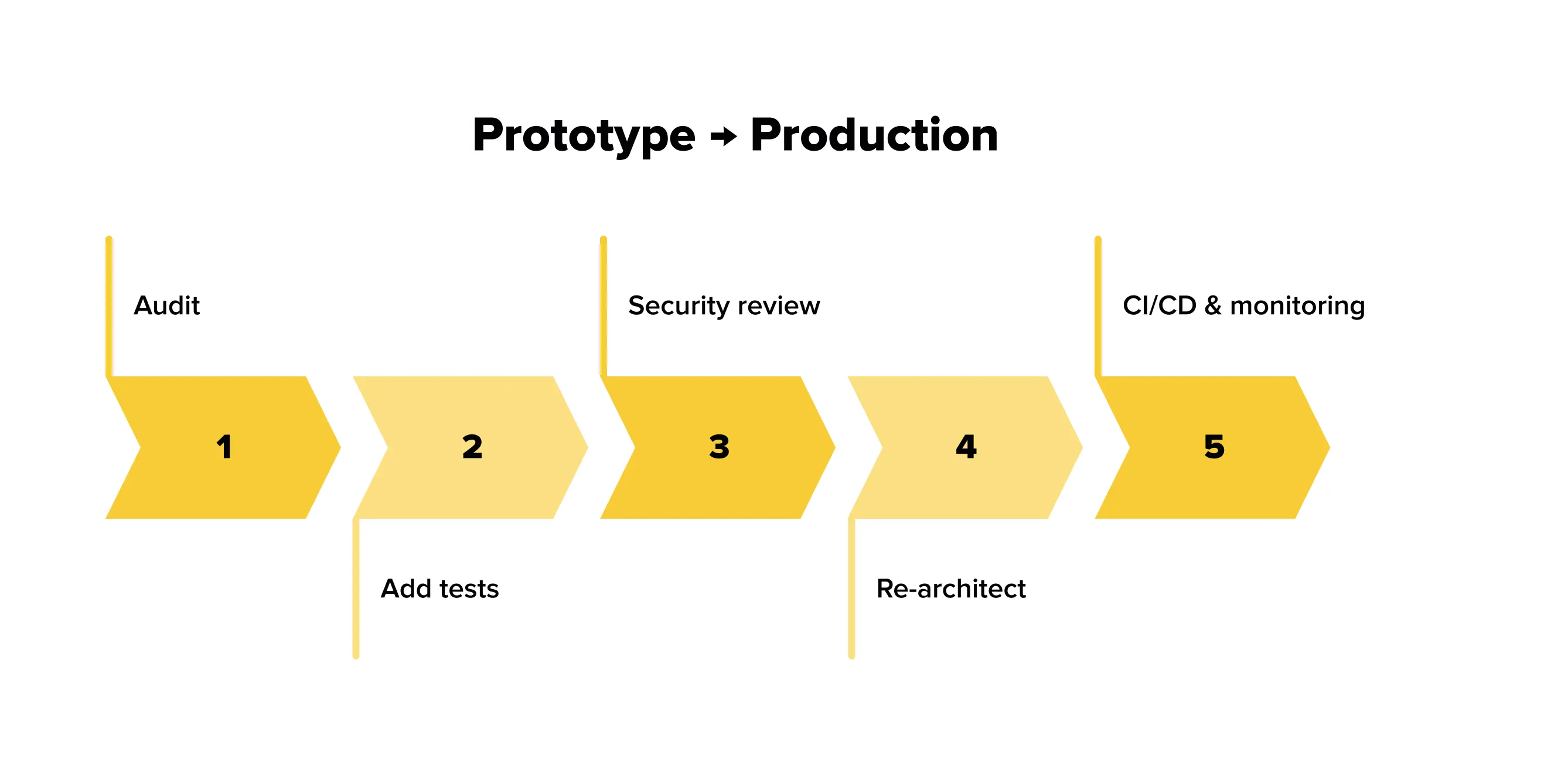
Step 1: Audit What Was Actually Built
Review the architecture, dependencies, database model, authentication flow, and generated implementation before adding another feature. Identify shortcuts that could become expensive later.
Step 2: Add Real Test Coverage
Build unit, integration, and end-to-end tests around critical user journeys. Many AI-generated applications have limited testing support, so teams should independently verify important behavior. Teams without internal QA capacity can use software testing services to establish a stronger validation process.
Step 3: Review Security and Data Handling
Check authentication, permissions, secrets, role-based access, and data storage. Confirm that sensitive information is transmitted and retained appropriately before real customers use the product.
Step 4: Re-architect for Maintainability
Separate duplicated or tightly coupled logic into clear modules. A clean structure makes future feature work easier for both humans and AI agents. If the product needs a dedicated mobile experience, mobile app development can then be approached as a deliberate engineering project rather than an extension of a temporary prototype.
Step 5: Set Up CI/CD and Monitoring
Add automated deployment, error tracking, logging, and performance monitoring. These practices turn a prototype into an operational product that can be observed and improved after release.
Common Mistakes Teams Make With Vibe Coding Tools
The biggest mistakes usually come from treating the tool as a substitute for product and engineering judgment.
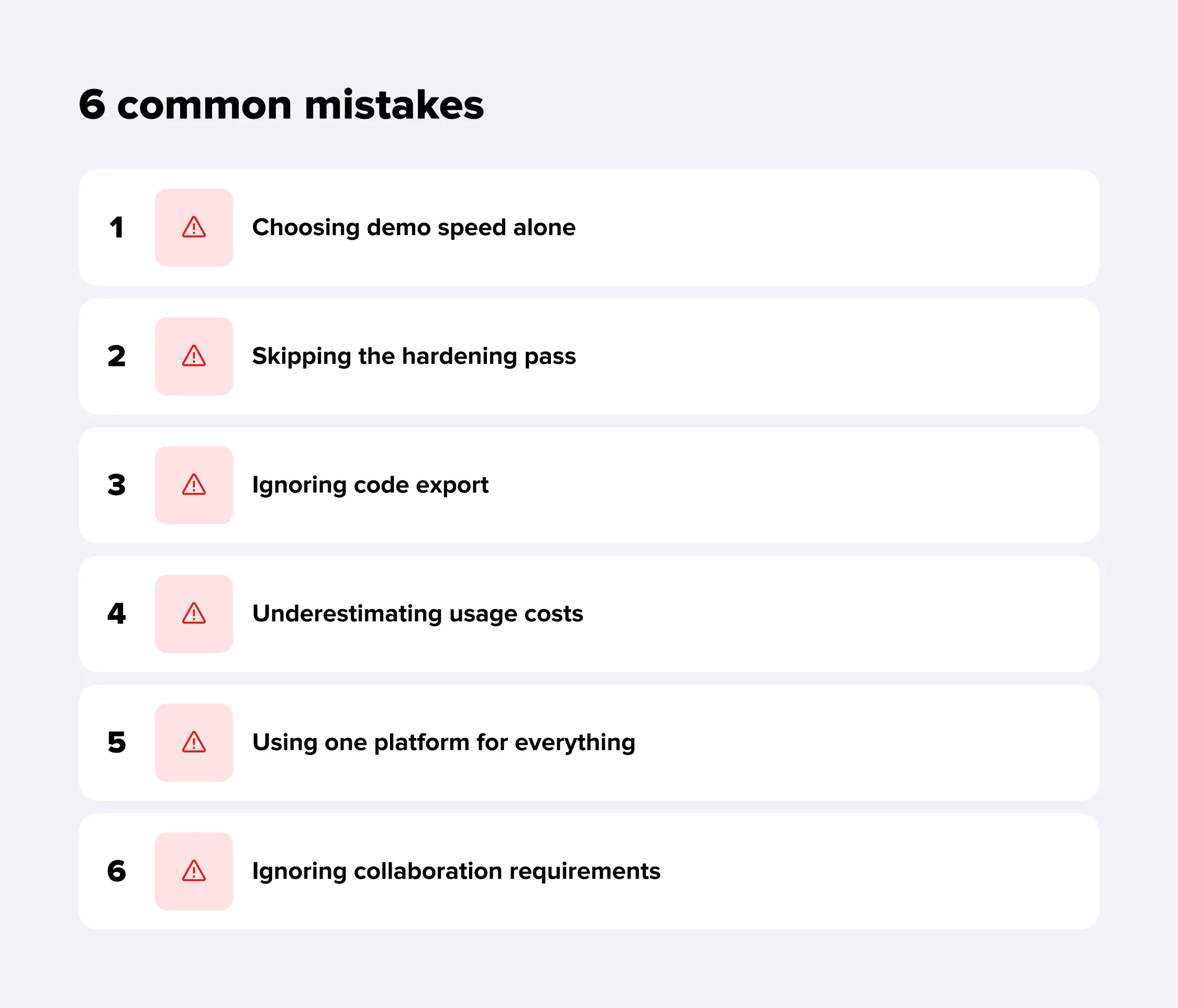
Choosing demo speed alone. A fast first screen says little about code quality, ownership, scalability, or future development cost.
Skipping the hardening pass. An MVP should not automatically become a production release just because every visible workflow works.
Ignoring code export. A platform that is convenient today may become restrictive when the application needs custom infrastructure or a larger engineering team.
Underestimating usage costs. Credits and token usage can grow faster than expected as prompts become longer, agents perform more actions, and multiple team members work on the same project.
Using one platform for everything. A UI component, CRM, native mobile app, and complex backend have different requirements. Matching the tool to the task is more efficient than forcing one platform to cover every scenario.
Ignoring collaboration requirements. A solo founder may not need advanced team collaboration, but a growing product team needs version control, review workflows, permissions, and predictable handoffs.
The strongest product teams therefore treat AI as part of their development process, not the entire process. Discovery, architecture, testing, version control, and release management still matter.
How Lampa Can Help Turn Your Vibe-Coded Product Into a Scalable One
Vibe coding is useful when a team needs to test an idea quickly. The challenge begins when that prototype becomes something customers depend on. At that point, the question changes from "Can we build this?" to "Can we maintain, secure, test, and scale it?"
Lampa can support that transition across the full product lifecycle. The work can start with product strategy and discovery, where assumptions, user flows, technical constraints, and the right development approach are defined before committing more resources.
For an existing prototype, the team can assess its architecture, dependencies, database structure, authentication, and performance before deciding whether to refactor it or rebuild selected parts. For products that need a stronger foundation, Lampa provides custom software development across web and mobile applications rather than forcing the project into a particular platform.
The same lifecycle can include dedicated AI engineering when teams want to turn isolated AI-generated features into a deliberate part of the product architecture. This can cover AI-powered workflows, integrations, agents, and other capabilities that need to work reliably within the wider application.
This is the same pattern Lampa has followed on its own projects: Dogiz started as a focused pet-care concept and grew into a full-featured app covering health tracking, services, and rewards; THD moved from an early concept into a cloud platform that uses connected-vehicle and machine-learning technology to manage city traffic flow; and the LUMI Smart TV app was built to run across Roku, Samsung, and LG rather than staying on a single platform. In each case, the early version defined the idea, and dedicated engineering carried it to production.
The goal is not to replace vibe coding. It is to use it where it creates leverage and add engineering where product risk requires it. If you already have a vibe-coded MVP, Lampa can help determine what is worth keeping, what needs to change, and how to turn the result into a product ready for real users and real scale.